Redesigned workspace
A clearer top toolbar, a larger composition stage, and a more focused imported-images panel.
The 2026.3.14 update brings a cleaner workspace, manual proportional scaling, front/back layer control, new project reset, and a more realistic live output preview.
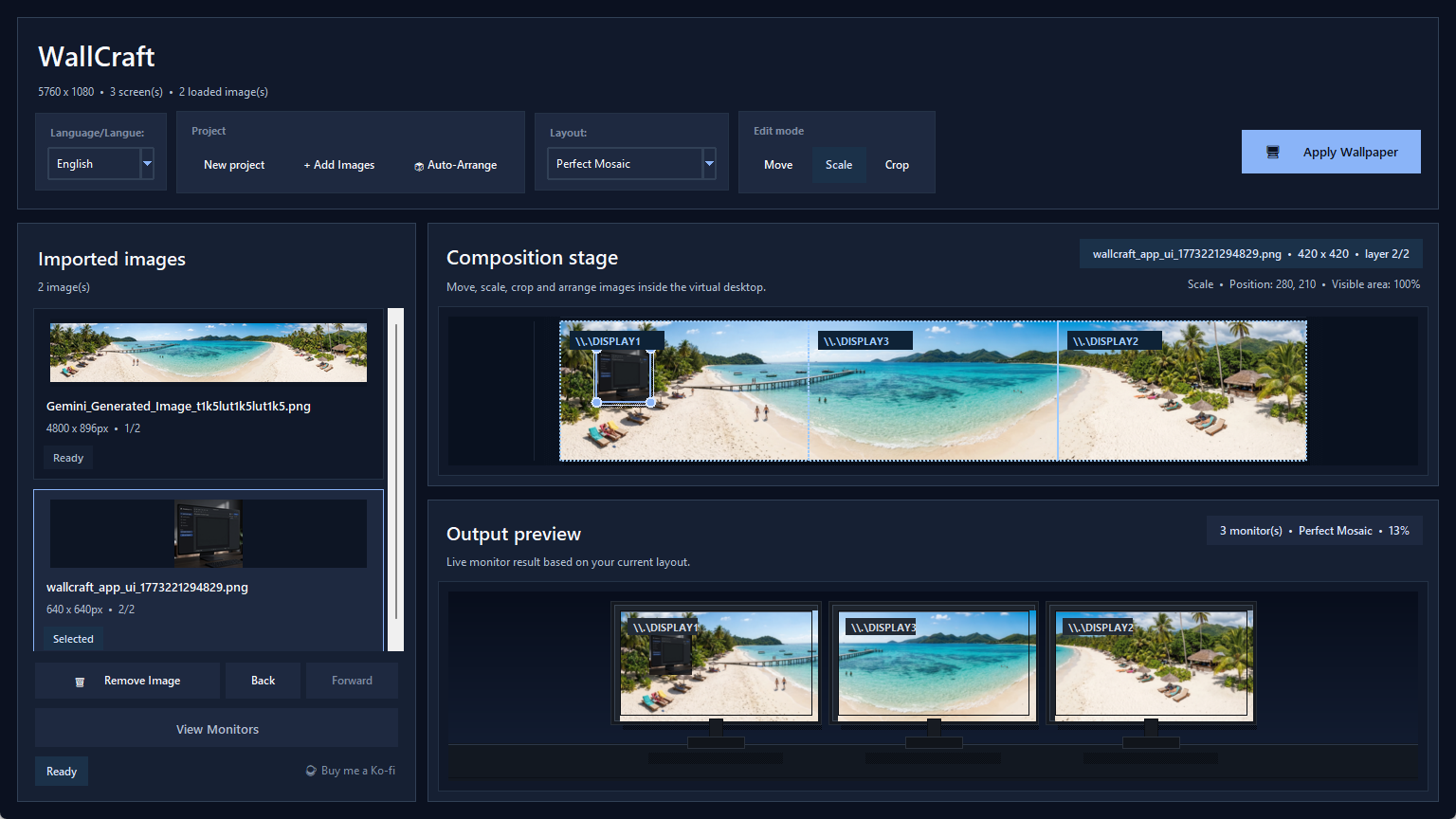
The refreshed interface focuses on composition, quick actions, and live monitor feedback.
The latest app refresh is focused on usability and visual editing speed.
A clearer top toolbar, a larger composition stage, and a more focused imported-images panel.
Enlarge or reduce a photo manually while preserving its aspect ratio.
Push an image backward or bring it forward directly from the library.
Start over instantly without manually clearing every imported asset.
The latest build centers the composition stage and makes the editing workflow more obvious at a glance.
Project actions, layout choice, language, and edit modes now sit in a more natural order.
The monitor preview now looks closer to a real desk setup, with darker frames and more breathing room between screens.

Preview the wallpaper on simplified black displays before exporting or applying it.
The latest version keeps the product simple from import to desktop.
Bring one or more photos into the project library.
Use one of the built-in arrangements or auto-organize the scene.
Adjust each image on the stage with dedicated edit modes.
Send an image backward or forward when overlaps matter.
Check the live monitor view, then export, split, or apply on Windows.
The new UI sits on top of the same no-crop, mixed-monitor workflow.
Fix the common dual-monitor wallpaper problem without forced cropping.
Keep every photo visible, even across uneven screens.
Handle different resolutions, heights, and aspect ratios cleanly.
Quick answers about the new editing workflow and the product itself.
No. The tool is designed around a fit-inside rule so the original image stays visible. Empty space can still exist, but cropping and distortion are avoided.
Yes. Mixed resolutions, different heights, and uneven desk layouts are the core use case.
Yes. The app can export a large composition and split the result into per-monitor images mapped to your physical setup.
Yes. The project uses the native Windows desktop wallpaper API when available, with a span fallback when needed.
Explore the download page, workflow details, and use cases.
Download WallCraft Pro for Windows 10/11 and see what changed in the 2026.3.14 site and interface refresh: redesigned workspace, manual scaling, layer order, and realistic output preview.
See how WallCraft Pro 2026.3.14 imports images, scales them manually, changes layer order, previews mixed-monitor results, and applies wallpapers on Windows.
Explore WallCraft Pro use cases for dual monitors, triple screens, laptop plus external displays, ultrawide setups, and mixed monitor sizes.
Read the WallCraft Pro FAQ about cropping, mixed monitor sizes, Windows support, split export, open source access, and download state.
Compare WallCraft Pro with Windows personalization, Wallpaper Engine, and DisplayFusion to choose the right tool for static mixed-monitor wallpapers.
Download the current build, test your monitor layout, and keep the GitHub repository nearby for updates and source code.